
Custom HMI screens written for the crew that runs the cell
We lay out the operator screens on our FANUC cells for the operators, leads and maintenance techs who use them, and program them in the same Fontana shop that wires the panel.
- Robots
- FANUC (LR Mate on the assembly cells)
- Assembly cell screen
- Cycle time per table, color changeover, faults
- PLC platforms
- Allen-Bradley, Siemens, AutomationDirect
- HMI on a legacy retrofit
- AutomationDirect C-more
- Off the panel
- iPhone status and push alerts
- Robots
- FANUC (LR Mate on the assembly cells)
- Assembly cell screen
- Cycle time per table, color changeover, faults
- PLC platforms
- Allen-Bradley, Siemens, AutomationDirect
- HMI on a legacy retrofit
- AutomationDirect C-more
- Off the panel
- iPhone status and push alerts
The HMI is the touch screen at the cell where operators start a run, change over, check counts and find out why something stopped. Ours are written alongside the robot program and the PLC logic, and every lamp and number on the screen is tied to a PLC signal we wrote and tested in our own shop.
In short
What the assembly cell screen shows
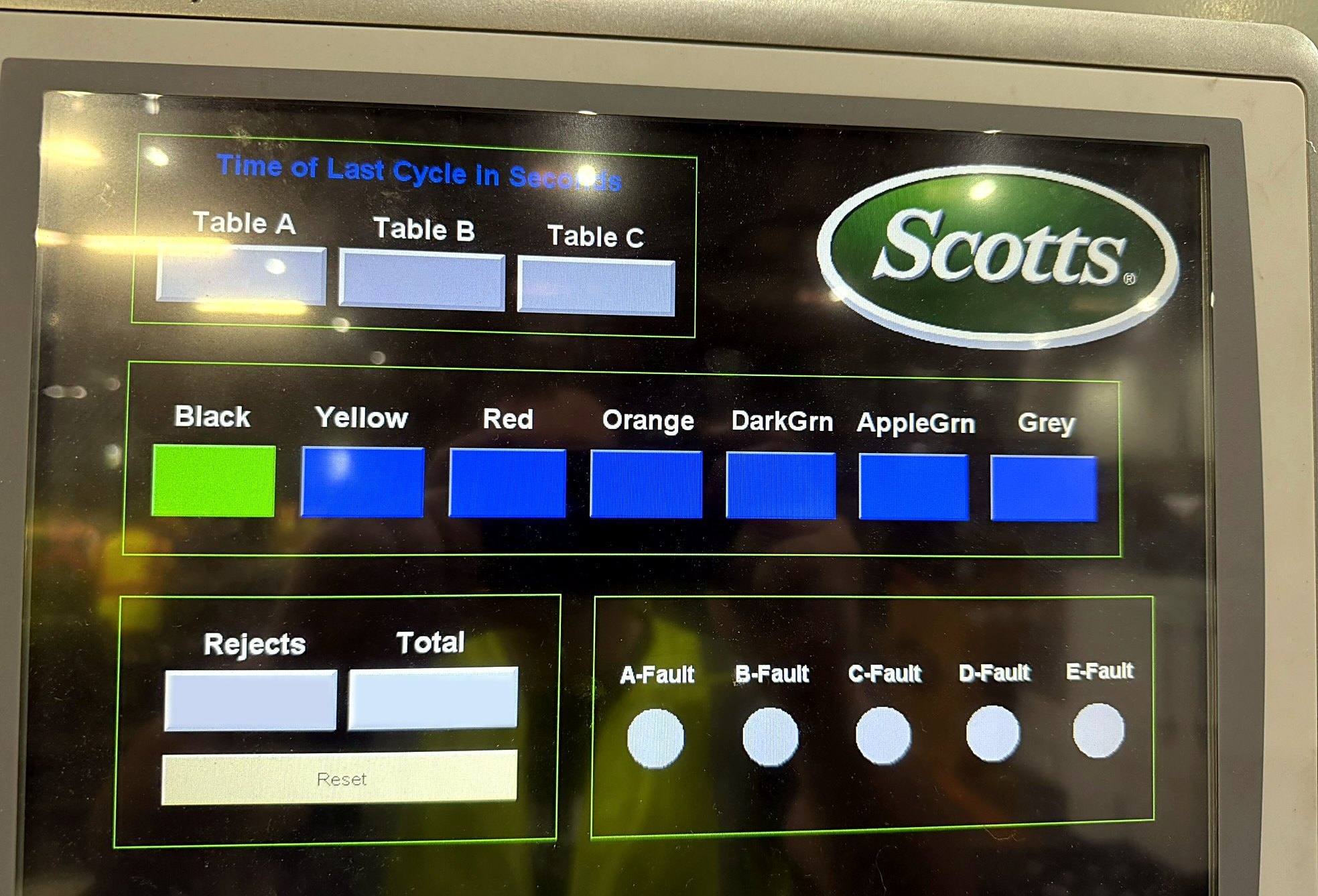
The screen in Fig. 1 belongs to the spray nozzle assembly cells we built for a national lawn and garden brand. LR Mate robots assemble the nozzles at three tables, each interlocked and light-curtained, and we built, wired and programmed the control panels. Four boxes share the screen:
- Time of last cycle for Table A, Table B and Table C, in seconds.
- Color buttons across the middle for changeover. Black is the one lit green in the photo.
- Rejects and total counts, with a reset button under them.
- Fault lamps, labeled A-Fault through E-Fault.
Each box answers something a lead would otherwise have to walk over and ask: which table is slow, which color is selected, how many parts were rejected, and where a fault is. The guarding on Table B carries a big yellow TABLE B sign, and the screen uses the same letters, so nobody has to turn a station number into a place on the floor.
Designing the first screen around the crew
The screens come with the cells we build and the controls retrofits we take on. Most of the design work happens before a screen is drawn, by working out who will stand in front of it.
| Who uses it | What they need from the screen |
|---|---|
| Operators | Start and stop, the job or color being run, counts, and a clear message when something stops |
| Leads and supervisors | Whether each station is keeping up and which one is down, readable while walking past |
| Maintenance | I/O status, device diagnostics, manual moves and setup values |
The first screen belongs to operators and leads. It should answer their questions without a menu, in the words they already use for stations, parts and colors, at a size they can read from where they stand. Setup values and manual controls go a level down behind a password, so a stray touch can’t change a setting mid-shift. Color is most useful when it marks a state, such as running, stopped, faulted or selected.
Plants that want a formal method can look at ANSI/ISA-101.01-2015, the ISA standard for designing and managing HMIs over their life cycle. ISA says it applies to discrete industries as well as continuous and batch processes. If your plant already has an HMI style guide, send it with the RFQ so the new screens match the rest of your floor.
Fault screens that say what to do next
A fault lamp shows where the cell stopped, but the crew also needs to know what happened and what to do about it. Good fault text names the station, says what the cell saw and gives the first thing to check, in plain words. A few examples, made up rather than taken from a specific cell:
| Unhelpful | Useful |
|---|---|
| Fault 214 | Table B: no part at the pick point. Check the bowl feeder, then press Fault Reset. |
| Safety fault | Table A light curtain blocked. Clear the load opening, then press the safety reset button at Table A. |
| Robot error | Table C: no part detected in the gripper. Check the fingers and the nest, then press Fault Reset. |
Safety stops and process faults should look different on the screen, because the fix for each is different. The screen reports safety status, but it is never the safety function. Guard interlocks, light curtains and emergency stops run through the safety circuit and safety logic, so they keep working if the screen freezes or loses power.
Every fault can also be logged with a time stamp and searched later, which gives maintenance a dated list of which faults stopped which station. The machine data and ERP integration page covers the logging side.
HMI programming with the PLC code behind it
The screens are written together with the PLC and safety logic, which we program on Allen-Bradley and Siemens. The panel is built and wired in our shop (more on the control panels page), and the screens run through the cell’s run-off in Fontana along with the rest of the code.
On a legacy machine retrofit, we replaced the old controls with an AutomationDirect Do-more/BRX PLC and a C-more touch screen. The controls retrofit page covers how that kind of job is planned. Custom machines get operator screens too: the automated tapping machine we built for an aerospace supplier has an HMI for real-time monitoring.
Whatever the platform, put the HMI project files on the handover list in your RFQ, next to the PLC program and the robot backups. Without the project file, changing a screen later can mean rebuilding it.
Beyond the panel: shop TVs and phones
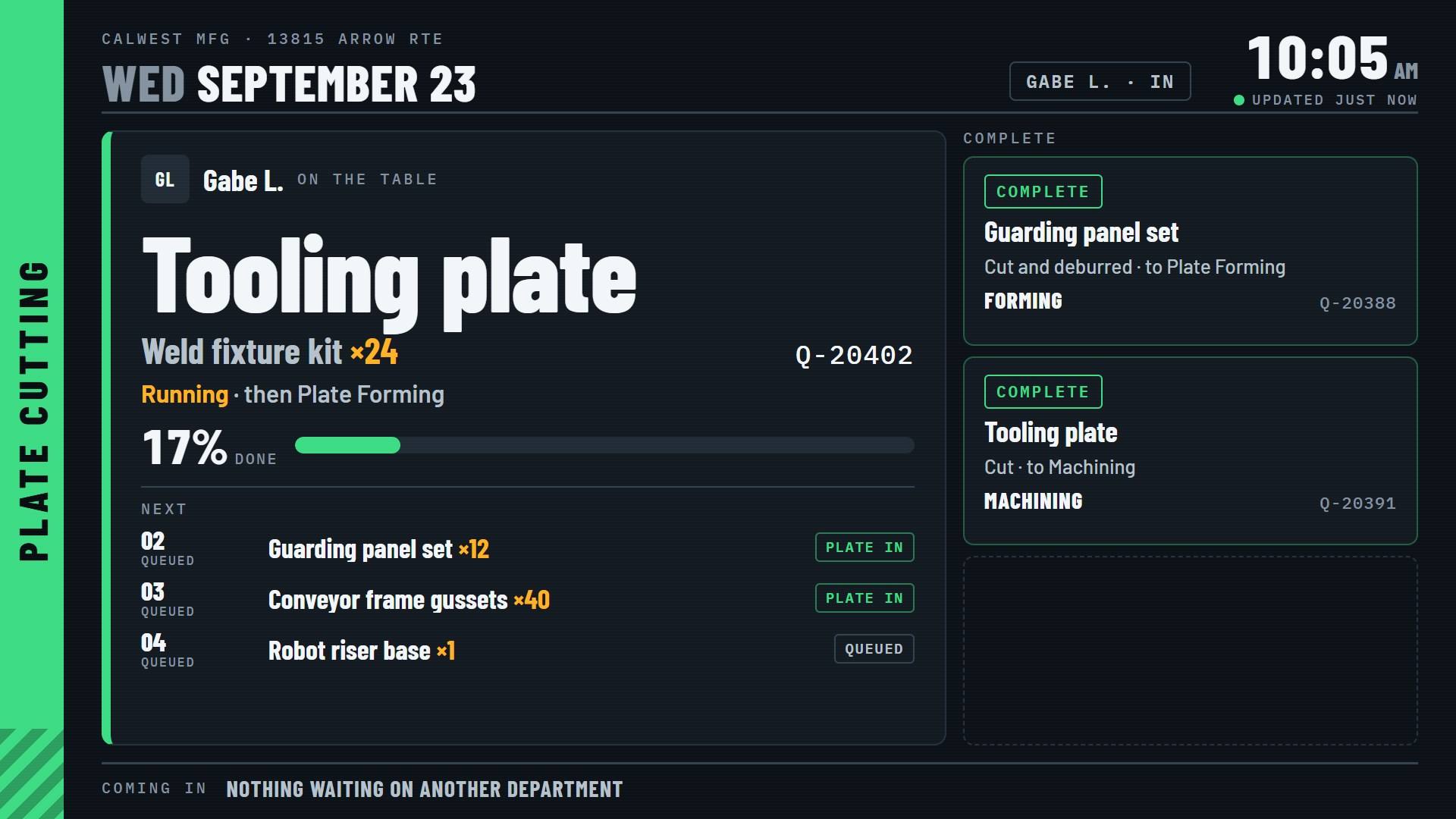
A screen at the cell only helps the people standing next to it. Status can also go to a TV on the shop floor, or to a supervisor’s iPhone as a push alert, so someone across the building knows a cell has stopped. We run CalWest Manufacturing on software we wrote ourselves: department boards on the shop TVs, live job tracking, and an iPhone app with jobs, schedules, team chat and push alerts.
Cell counts, jobs and scrap can also post straight to your ERP. The rest of our controls work is on the controls and software page.
What to tell us about the people running the cell
- Who stands at the screen on each shift: operators, leads, maintenance
- What they track by hand today, such as tally sheets or a whiteboard
- The names your crew already uses for stations, parts and colors
- Which faults stop the line most often now
- The PLC and touch panel brands your maintenance team supports
- Whether counts or scrap need to reach your ERP
Common questions
- What should a robot cell HMI show?
- At minimum, whether the cell is running, what it is set up to run, whether each station is keeping up, how many good and rejected parts it has made, and a plain-language message when something stops. On our spray nozzle assembly cells, that means the last cycle time for each table, color changeover, reject and total counts, and fault status on one screen. Setup values and manual controls belong a level down, behind a password.
- Is the HMI the same as the FANUC teach pendant?
- No. The teach pendant, which FANUC calls the iPendant, is the handheld unit for jogging the robot and for teaching and editing its programs, so it mostly belongs to whoever programs and maintains the robot. The cell HMI is a touch screen tied to the PLC that coordinates the whole cell, including conveyors, feeders, guard status and counts. Operators work from the HMI during a shift.
- Can operators and supervisors see cell status on their phones?
- Yes. We write iPhone apps that put status and push alerts in the team's pocket, so a supervisor somewhere else in the building hears about a stopped cell without walking the floor. We run our own shop this way, with an iPhone app for jobs, schedules, team chat and push alerts. Tell us which events should send an alert and who should get it.
- What touch panel will our cell use?
- That gets settled with the PLC during control panel design. We program PLC logic on Allen-Bradley and Siemens, and on a legacy machine retrofit we paired an AutomationDirect Do-more/BRX PLC with a C-more touch screen. If your maintenance team already stocks one brand of touch panel and knows its software, tell us at the start so it goes into the panel design.
- Can the cell keep a record of cycles and faults?
- Yes. The cell can log each cycle and fault with a time stamp, and the log shows which station stops most and when. Counts, jobs and scrap can go into your ERP through custom Python we write, so nobody re-keys them at the end of a shift. Tell us which ERP you run early on, because that decides how the link is built.