
Machine monitoring that logs every cycle, fault and stop
We set up cells and machines to log every cycle and fault with a time stamp, so each stop has a reason attached and OEE comes from real records instead of a clipboard.
- Logged
- Every cycle and fault, time-stamped
- To the ERP
- Counts, jobs and scrap
- Alerts
- Push alerts on iPhone
- Written by
- The team that programs the PLC and robot
A machine monitoring system answers plain questions with records instead of opinions: is the machine running, how many good parts did it make, why did it stop, and for how long. We build that kind of monitoring into robot cells and machines when the job calls for it: every cycle and fault gets a time-stamped record that can be searched later, counts, jobs and scrap post to the ERP, and a stop can reach a supervisor’s iPhone as a push alert.
In short
How the data gets from the PLC into the ERP is covered on machine data and ERP integration. This page is about what to record and what to do with it.
What should a machine monitoring system record?
Most of what matters already passes through the PLC, because the PLC sequences the cell and watches its sensors. The job is to record it consistently.
| Record | Where it comes from | What it tells you |
|---|---|---|
| Machine state: running, idle, faulted, blocked, starved | PLC | Where the time went, shift by shift |
| Cycle complete, with cycle time | PLC and the robot handshake | Output, and which station is slow |
| Good and scrap counts | PLC, sensors, inspection | Quality, and scrap per job |
| Fault code and text, when it started and cleared | PLC, robot alarms passed to the PLC | Downtime by cause |
| Job or recipe running | Operator screen or ERP | Which job the output and the stops belong to |
| Operator-entered stop reason | Operator screen | Stops the machine can’t see: no material, waiting on quality, break |
Blocked and starved are worth separating from faulted. A starved machine is waiting on the step before it and a blocked one can’t unload to the step after; neither one is broken, and the fix is somewhere else on the line.
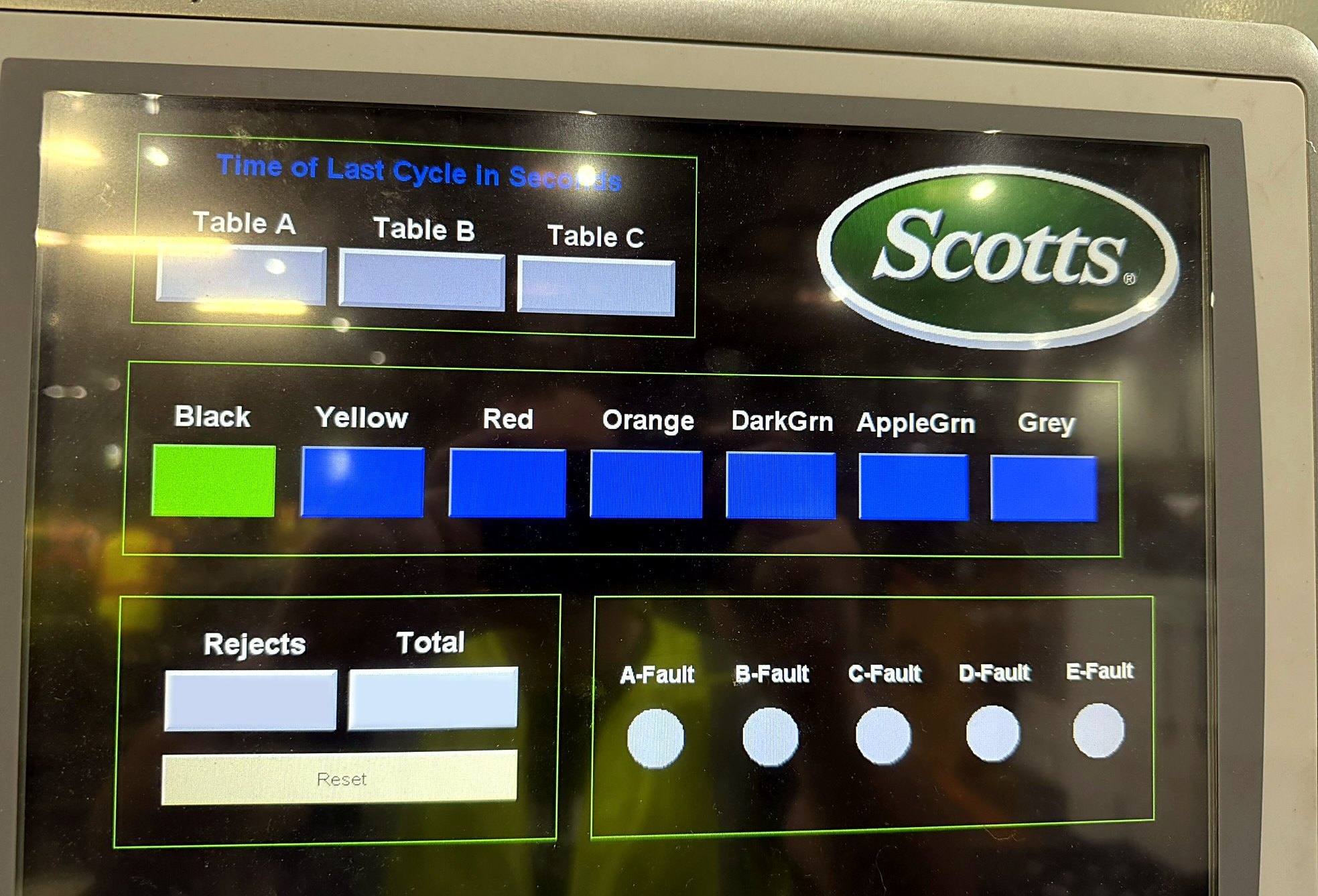
The screen in Fig. 1 shows the same kind of information at the machine: cycle time per table, rejects and totals, and fault status. A monitoring system keeps that information after the shift ends, so it can be compared across days and jobs.
Downtime tracking: give every stop a reason
Stops come in two kinds. Faults the PLC can see, such as a sensor timeout, a jam or a robot alarm, can be recorded automatically with their start and clear times. Stops with no fault behind them, such as no material, a changeover or a quality hold, need a person to say why.
The usual approach is a short reason list on the operator screen, offered when a stop runs past a length you choose. Keep the list short enough to fit on one screen, in the words the crew already uses, and review it after a few weeks. The OEE reference site oee.com counts stops long enough to be worth a reason against availability, while small stops and slow cycles show up as performance loss instead. A threshold that sorts the two keeps the reason list from filling up with short blips.
Once reasons are flowing, sort them by total time lost, not by how often they happen. One long changeover can outweigh a pile of short jams.
OEE tracking software: the formula and where it goes wrong
OEE, overall equipment effectiveness, multiplies three factors. As oee.com defines them:
- Availability = run time ÷ planned production time
- Performance = (ideal cycle time × total count) ÷ run time
- Quality = good count ÷ total count
OEE is availability × performance × quality. Multiplied out, it reduces to good count × ideal cycle time ÷ planned production time: the share of planned time spent making good parts at full speed.
The arithmetic is easy. The definitions are where OEE goes wrong:
- A padded ideal cycle time makes performance look better than it is. Use the fastest cycle the process can really achieve.
- Counting reworked parts as good hides quality loss. In oee.com’s definition, a good part is one made right the first time, without rework.
- Changing what counts as planned time from month to month makes the trend meaningless.
Our OEE guide works through the formula with an example.
Getting data out of different machines
| Machine | Usual route |
|---|---|
| Robot cell or machine with a networked PLC | Read the PLC over EtherNet/IP, OPC UA or Modbus TCP, with small program changes to count cycles and hold faults for the log |
| FANUC robot | Alarms and cycle signals go to the PLC through the handshake, and are logged with the rest of the cell |
| CNC machine tool | Often MTConnect, an open, royalty-free standard for manufacturing equipment data, or OPC UA |
| Older relay-logic machine | A few signals wired to a small PLC that counts and logs, or a controls retrofit |
A log that claims every fault has to catch faults that set and clear quickly, and it can’t lose records while the network or a PC is down. The PLC holding each record until the logging program confirms it has it is the usual way to manage both.
Where the data lives and who sees it
Keep the records in a database, not in the operator screen’s alarm history, which usually rolls over. From there the same records can feed a shift report, a board on a shop TV, an iPhone push alert when a machine stops, and the counts, jobs and scrap that post to the ERP. We run our own shop on department TV boards and an iPhone app we wrote; custom manufacturing software shows them.
Keep the machine network apart from the office network, and have your IT group review any link between them. The ISA/IEC 62443 series sets out security requirements for industrial automation and control systems and is a reasonable reference for that review.
Monitoring cells that run unattended
Monitoring matters most when nobody is standing at the machine. The machine tending cell we built to move parts from a Swiss lathe through a heater and into a forge supports lights-out operation, and a cell like that needs a way to tell someone it has stopped and why. An alert that names the machine and the fault in plain words, sent to the person who can act on it, does more than a dashboard nobody is watching at 2 a.m.
Start with one machine
Useful to send with your first message
- The machine or cell to start with, and why it matters
- The PLC and robot controller models, or photos of the panel
- The reasons it stops today, as the crew would say them
- Who should get an alert, and for which stops
- The ERP you run, if counts or scrap should post to it
Monitoring is part of the controls and software work on our robot cell controls and software page, and it can be built into any robot cell we build. To talk through monitoring for your machines, call or text (818) 397-4809.
Common questions
- What is a good OEE number?
- There is no single right number, because OEE depends heavily on how planned time and the ideal cycle time are defined. A padded ideal cycle time makes any machine look good. The useful comparison is a machine against itself over time, measured the same way, and the useful output is the list of losses behind the number. Our OEE guide works through the formula with an example.
- Can older machines be monitored?
- Usually, at some level. A machine with a networked PLC can often be read with small program changes. A CNC machine tool may support MTConnect or OPC UA. A relay-logic machine can have a few signals, such as cycle complete and fault, wired into a small PLC that does the counting and logging. When the controls themselves are failing, a controls retrofit can bring monitoring along with it.
- Do we need an MES to track downtime?
- Not to start. Downtime tracking needs a record of each machine's state with time stamps, a reason for each stop, and somewhere searchable to keep it. That can be a modest database and a few screens. A full manufacturing execution system makes sense when you also need scheduling, genealogy or work instructions across many machines, and it can take the same machine data later.
- How do operators enter downtime reasons?
- On the operator screen at the machine, as a short list of reasons that fits on one page, offered when a stop runs past a length you choose. Faults the PLC can see, such as a sensor timeout or a robot alarm, are recorded automatically. The reason list should use the crew's own words and be reviewed after a few weeks, because a long list or an 'other' button ruins the data.
- Can monitoring data go to our ERP?
- Yes. We write custom Python that ties machines to the ERP, so counts, jobs and scrap post automatically and nobody re-keys them. Which ERP you run decides how the link is built: through an API, a database or file import, or the ERP's own screens. Tell us the ERP and the controller models early, and the monitoring and the ERP link can be planned together.