
Posting machine counts to your ERP and logging every fault
We write the software that logs every cycle and fault on a machine and posts counts, jobs and scrap to your ERP, so nobody re-keys them at the end of a shift.
- Logged
- Every cycle and fault, time-stamped
- Posted to the ERP
- Counts, jobs and scrap
- ERP link
- Custom Python, written in-house
- Alerts
- Status and push alerts on iPhone
- Logged
- Every cycle and fault, time-stamped
- Posted to the ERP
- Counts, jobs and scrap
- ERP link
- Custom Python, written in-house
- Alerts
- Status and push alerts on iPhone
A machine with a PLC often already counts its parts and shows why it stopped on an alarm screen. ERP machine integration puts those numbers into the business system as they happen, instead of on a clipboard that gets typed in the next morning. At CalWest Robotics we write that software in-house, in the same Fontana, CA shop where we build and program robot cells.
In short
What goes wrong when production counts are re-keyed
On a lot of shop floors the count still travels by hand. An operator writes down parts made and parts scrapped, and someone types the sheet into the ERP later, sometimes the next day. Each hop is a chance for a transposed digit, a skipped line or a scrap count that gets rounded down.
Timing is the other problem. Until the sheet is typed in, the ERP is describing yesterday, and the schedule is built on old numbers. When the machine posts its own counts, the ERP shows the shift as it runs.
PLC data logging for every cycle and fault
When we set up logging on a cell, every cycle and every fault gets a record with a time stamp, and the records can be searched later. Most of that information already passes through the PLC, because the PLC sequences the robot, the feeders and the fixtures and watches the guarding. That makes it the natural place to collect from.
What goes in each record depends on the machine. As a general guide:
| Record | What it usually holds | What people use it for |
|---|---|---|
| Cycle complete | Time, station or table, part count, good or scrap | Counts per shift and per job |
| Fault | Fault code and plain-language text, when it started, when it cleared | Finding the stops that cost the most time |
| Changeover | Time, and the recipe or color selected | Matching output to the job that was running |
| Quality check | Pass or fail, and the measured value where there is one | Tracing a bad part back to when it was made |
A log is only useful if someone can search it. A maintenance lead can pull every cycle run during one job, or a month of faults on one station, and see which stop came up most often.
How machine data reaches the ERP
The robot controller, the sensors and any vision system report to the PLC, over hard-wired I/O or an industrial network. From there the data goes three ways (Fig. 2): into a time-stamped log of every cycle and fault, to the ERP as counts, jobs and scrap, and to phones as status and push alerts. The link between the machines and the ERP is custom Python that we write in-house.
How the Python talks to the PLC depends on the controller. Allen-Bradley Logix controllers use EtherNet/IP, which carries the Common Industrial Protocol over standard Ethernet. Many other controllers offer OPC UA or Modbus TCP. The choice follows the hardware you already have.
A log that claims every cycle and fault needs more than a program that reads the PLC now and then. A fault that sets and clears between two reads would never show up, and anything that happens while the network or the PC is down would be lost. The usual fix is for the PLC to hold each record until the reading program confirms it has it. Downtime by reason and the other reports built on that log are covered under machine monitoring.
Storing PLC data in a SQL database
A log like this usually lives in a SQL database, which most reporting tools and spreadsheets can query directly. Keep the raw cycle and fault records rather than only shift totals, so any total can be traced back to the cycles behind it. Those raw records are also what an honest OEE calculation is built from. Where the database runs, on a server at your plant or wherever your IT group prefers, is decided with them.
Posting counts, jobs and scrap to the ERP
The ERP end is where most of the job-specific work sits. Some ERPs accept production data through a documented API, some through a database or file import, and some only through their own screens. Each count also has to land on the right job or work order, so the cell needs to know which job it is running, either from the operator screen or from the ERP. Scrap is easiest to trust when the machine uses the same reason codes the ERP already has.
Keep the machine network and the office network apart, with the data link crossing between them in a controlled way. The ISA/IEC 62443 series sets out security requirements for industrial automation and control systems, and your IT group should review how the link is built before it goes live. Phone alerts also have to leave the plant over the internet, so that path belongs in the same review.
Shop floor data collection for quality checks
Counts and faults are the starting point. Where a cell measures something, the result can be logged too. On a robotic drilling cell we built, a FANUC robot with a tool-changing router head drills hundreds of holes in complex 3D parts. A vision system then verifies each drilled hole, and the results are logged as quality data.
A quality engineer can look back at a given day or shift instead of relying on a paper check sheet. If those results need to reach an ERP or a quality system, the same Python link that posts counts can carry them. How cameras check parts at the robot is covered on vision-guided robotics.
Machine alerts on iPhone
A stopped cell costs output for as long as nobody knows about it. A push alert on the supervisor’s iPhone names the cell that stopped, even when they are on the other side of the building.
This matters most on cells built to run with nobody watching. The machine tending cell we built to move parts from a Swiss lathe through a heater and into a forge supports lights-out operation, and a cell like that needs some way to tell a person it has stopped.
In general, an alert is worth sending when it:
- names the machine and the fault in plain words, not a bare fault code
- goes to the people who can act on it, not the whole plant
- follows up when the machine is running again, so nobody heads out for a fault that has already cleared
We run our own shop on software we wrote
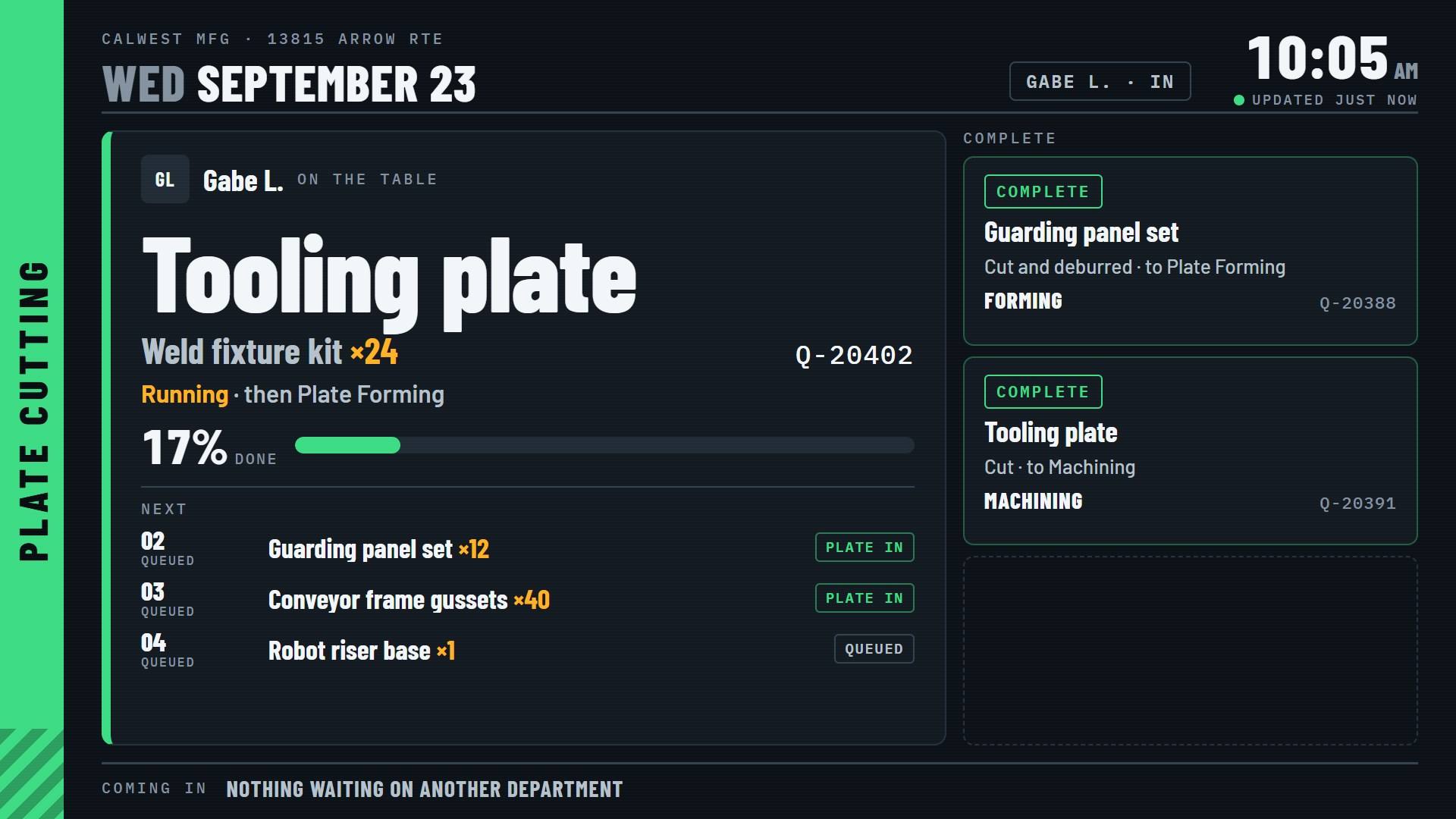
CalWest Manufacturing runs on software we wrote ourselves: department boards on the shop TVs, live job tracking, and an iPhone app with jobs, schedules, team chat and push alerts. The plate cutting board in Fig. 1 is one of those TV boards, and Fig. 3 is the messages screen from the iPhone app. Both are shown with sample data.
The people who write this software also write the robot and PLC programs and the custom HMI screens at the machine, so the operator screen and the ERP link can both be built on the same PLC data.
What we need to know about your ERP
Tell us which ERP you run, and how it is hosted, when you first reach out. That decides how the link is built more than anything on the machine side.
Useful to send with your first message
- The ERP name and version, and whether it runs in the cloud or on a server at your plant
- Whether it has an API, and who administers it: your IT group, the ERP vendor or a consultant
- How jobs or work orders are numbered, and how scrap is recorded today
- The PLC and robot controller models on the machines you want connected
- The numbers someone re-keys by hand now, and who uses them afterward
If the machines are new, the data link can be planned along with the cell. If they are older and the controls are the real problem, a controls retrofit may need to come first. The PLC side of this work is on PLC programming, and the rest of our controls work is on robot cell controls and software. To talk through a data link for your machines, call or text (818) 397-4809.
Common questions
- Can you connect our machines to our ERP?
- Yes. We write custom Python that ties machines to the ERP, so counts, jobs and scrap post automatically and nobody re-keys them. How the link is built depends on the ERP: whether it has an API or accepts imports, and whether it is hosted in the cloud or on a server at your plant. Tell us the ERP and the controller models on your machines in your first message, and we can talk through what the link would involve.
- What data should we log from a robot cell?
- Start with every cycle and every fault, each with a time stamp. Cycle records give counts per shift and per job, and fault records show which stops cost the most time. Add changeovers, so output can be matched to the job that was running, and any measurement or pass/fail check the cell makes. Keep it somewhere searchable, so someone can pull a weekend's faults on one station without scrolling through an alarm screen.
- Do we need new machines to collect data?
- That depends on the controls, so check before buying anything. A machine with a networked PLC can usually be read without new hardware, over EtherNet/IP, OPC UA, Modbus TCP or whatever else it supports, though the PLC program may need small changes to count cycles and hold faults for the log. Older machines with relay logic or a closed controller may need a few signals brought out to a PLC, or a controls retrofit that replaces the PLC and HMI. Send us the controller model and a panel photo.
- Where does the logged data live?
- In a database, not on the machine. An HMI alarm screen usually keeps a limited history that rolls over as new alarms come in, so it is no place for a record you want to keep. A SQL database can hold every cycle and fault for as long as you need them. Your IT group should help decide where it runs and sign off on how the machine network connects to it.
- Can we get machine alerts on our phones?
- Yes, on iPhone. We write iPhone apps that show machine status and send push alerts, so a supervisor knows a cell has stopped wherever they are in the building. We run our own shop on an iPhone app we wrote, with jobs, schedules, team chat and push alerts. It is worth deciding, machine by machine, which faults send an alert and who gets it, so the phones do not buzz for every minor stop.