
Conveyor system integration for robot cells and lines
We tie conveyors into the robot, the PLC and the safety circuit, so parts stop where the robot expects them and a jam stops the right things.
- Robots
- FANUC
- PLCs
- Allen-Bradley, Siemens
- Tracking
- FANUC line tracking, iRPickTool
- Made in-house
- Guarding, stands, fixtures, panels
Conveyor system integration is the work of making a conveyor, a robot, a PLC and a safety circuit behave as one machine. The conveyor has to bring each part to the spot the robot expects, tell the robot it is there, hold back the next one, and stop the right things when something jams. CalWest Robotics doesn’t manufacture conveyor. We tie new or existing conveyor into FANUC robot cells, and we make the guarding, stands and fixtures around it in our own Fontana, CA shop.
In short
Roller, belt or chain: which conveyor feeds a robot best?
The part decides most of it: its size, weight, bottom surface and how gently it has to be handled.
| Type | Carries well | Notes for a robot cell |
|---|---|---|
| Flat belt | Small, light or loose parts, food, bags | A steady surface for a camera and for picking on the move |
| Powered roller | Cases, totes and trays with flat bottoms | Easy to split into zones for accumulation; small items fall between the rollers |
| Chain or slat | Pallets, heavy fixtures, rough parts | Rugged, and the usual way to move pallets in and out of a cell |
| Pallet or fixture conveyor | Parts held in fixtures that travel with them | Each fixture stops and is located at a station, so the part position is known |
Fixed pick point or a moving belt?
A robot can take parts off a conveyor in two ways.
Stop and pick. The part runs to a hard stop or a pop-up stop, a photo eye or proximity sensor sees it, and the PLC tells the robot a part is ready. The robot picks from one taught spot. Case palletizing usually works this way. In the palletizing cells we built for a lawn and garden plant in Temecula, CA, FANUC robots grip each case off the end of the packaging line, turn it and place it on the pallet, layer by layer.
Pick on the move. The belt keeps running. An encoder on the conveyor reports how far it has moved, and a camera or sensor upstream records where each part sits. The robot follows the part and picks it without stopping the belt. FANUC calls this line tracking, and its iRPickTool software handles picking from moving conveyors and balancing the load across several robots. On a vision-guided line we built, a camera finds every part on a moving belt and two FANUC delta robots pick them into trays, sharing the load. Each robot has its own camera and encoder, and both controllers hold the full line map. Our iRPickTool and line tracking guide walks through the setup.
| Stop and pick | Pick on the move | |
|---|---|---|
| Conveyor | Stops or indexes for each part | Runs continuously |
| Sensing | Photo eye or proximity sensor at the pick point | Encoder on the conveyor, plus a camera or sensor upstream |
| Robot program | One taught pick position | Pick position shifts with belt travel |
| Suits | Cases, totes, heavier parts, palletizing | Light parts arriving loose, high part counts, several robots on one belt |
Accumulation conveyor: how much buffer does a robot cell need?
Every robot cell stops now and then: a pallet change, a gripper fault, someone opening a guard door. Accumulation conveyor ahead of the cell lets the line upstream keep running through those short stops. Zero-pressure accumulation holds parts in separate zones so they don’t push on each other, which matters for crushable cases and parts that scuff. Minimum-pressure accumulation lets parts touch with light pressure. It is simpler, but only suits rugged product.
Sizing the buffer is arithmetic. For example, if a line sends 12 cases a minute and the longest stop you want to ride through is three minutes, the conveyor needs room for 36 cases, plus some margin, before the machines upstream have to wait. A photo eye near the upstream end of the buffer tells the PLC when it is nearly full, so it can warn the crew or slow the line before parts back up into the packaging machines.
Conveyor controls: photo eyes, VFDs and the robot handshake
Most of a conveyor’s logic lives in the cell PLC, which we program on Allen-Bradley or Siemens. A typical signal list:
| Photo eyes | Part at the pick point, buffer full, jam detection, part counts |
|---|---|
| Encoder | Belt travel, for line tracking and for spacing parts |
| Motor control | Variable frequency drives (VFDs) for speed and soft starts and stops; zone controllers on motor-driven roller accumulation |
| Stops and locators | Pop-up stops, hard stops, lift-and-locate units at a station |
| Robot handshake | Part ready, robot clear, part picked, conveyor running, fault |
| Safety | E-stops along the conveyor, guard door switches, light curtains at openings |
Jam detection is a good example of logic the PLC has to own. If a photo eye stays blocked longer than a part should take to pass it, or a part doesn’t reach the next eye in time, the conveyor stops and the operator screen says where. VFDs let a conveyor ramp up and down instead of jerking, so tall cases don’t tip and parts don’t slide out of position at the pick point.
The robot and the PLC trade the handshake over EtherNet/IP or hard-wired I/O. When one team writes both sides, as we do, a missed pick gets traced through the conveyor, the PLC and the robot program by the same people. Our PLC programming page covers the rest of that work.
Conveyor interlocks and safety at the cell boundary
The conveyor is often the weak spot in a cell’s guarding, because it has to pass through the fence. Openings are kept as small as the product allows. Where something large leaves the cell, such as a full pallet, the opening usually gets a light curtain that is muted for the pallet and trips for anything else. The conveyor has hazards of its own too: in-running nip points where a belt or chain wraps a pulley or sprocket, and parts that can fall or be pushed off.
ASME B20.1-2024 is the US safety standard for conveyors and related equipment, covering their design, construction, installation, maintenance, inspection and operation. Servicing a conveyor also falls under OSHA’s lockout/tagout rule, 29 CFR 1910.147, so lockout points for each conveyor section get planned along with the cell. We do a risk assessment on every cell and choose the safeguards from it, and your own safety professional should review it. The robot risk assessment guide and our robot cell guarding page go further.
Feeders, fixtures and guarding made in-house
Not every part reaches a robot on a belt. On the LR Mate assembly cells we built in Temecula, bowl feeders present parts to the robots nonstop, lined up the same way every time so the robot never has to search for one.
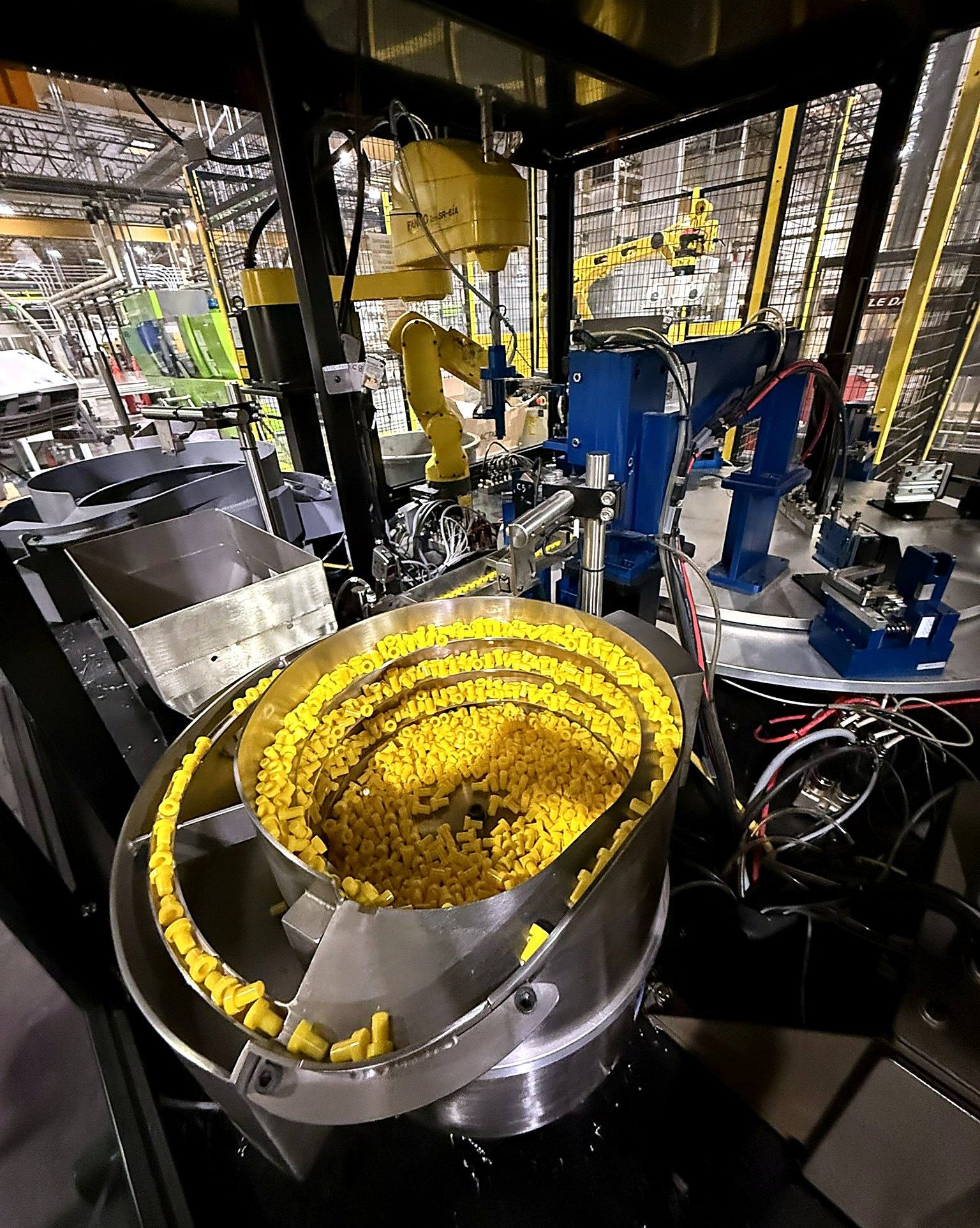
The guarding, stands, risers and fixtures around a conveyor or feeder are made in the same building as the cell. CalWest Manufacturing runs laser cutting, press brakes, welding and 5-axis machining there, so a fixture or guard panel that needs to change at run-off gets changed in our shop instead of on your floor.
How we tie a conveyor into a robot cell
-
Model the line
The cell is modeled in SolidWorks with the conveyor, the pick point and the guarding, and the robot paths are checked in FANUC ROBOGUIDE before they run on the real robot.
-
Agree on the signals
One list of every conveyor, PLC and robot signal, with what the cell does when each one fails.
-
Build and wire
The control panel is built, wired and tested here, and the guarding, stands and fixtures are fabricated in-house.
-
Run-off
The finished cell runs off in our Fontana shop with real parts before it ships.
-
Commission on site
The cell is tied into your conveyors and line controls, pick points are touched up, and every fault is tested on purpose.
Conveyor work usually comes as part of a larger job, such as robotic material handling or a palletizer at the end of a packaging line. Every application we build is listed under FANUC robot cells, and we ship and install them at plants across the United States.
What to send us for a conveyor job
- A layout or photos of the conveyor and the floor space around the robot
- The parts or cases it carries, with sizes, weights and how many per minute
- Make and model of existing conveyor, drives and PLC, if you have them
- A phone video of parts running, including a jam or a stop if you can catch one
- What should happen upstream and downstream when the robot stops
Common questions
- Can you connect a robot to the conveyors we already have?
- Usually. The questions are what starts and stops each conveyor today, whether a PLC runs it, whether the motors are on drives, and where sensors can be mounted near the pick point. A conveyor with nothing more than a start button can be brought under PLC control. Send photos of the conveyor, its control panel and the motor nameplates, plus a video of parts running.
- Do you build the conveyors?
- We don't manufacture conveyor. When a project needs new conveyor it comes from a conveyor manufacturer, and we design the cell around it, make the guarding, stands and fixtures in our own shop, build the control panel and write the PLC and robot programs. If you already have conveyor in place, we tie the robot into it.
- What is robot conveyor tracking?
- Tracking lets a robot pick parts off a belt that keeps moving. An encoder on the conveyor reports belt travel, a camera or sensor upstream records where each part sits, and the robot controller shifts the pick point as the belt carries the part toward it. FANUC calls this line tracking, and iRPickTool adds load balancing when several robots share one belt.
- How does the robot know a part is really there?
- A sensor at the pick point tells the PLC a part has arrived, and the PLC passes a part-ready signal to the robot. After the pick, a vacuum switch or a sensor in the gripper confirms the part is held. If either check fails, the program waits, retries or raises a fault that names the station, instead of carrying on with an empty gripper.
- What happens upstream when the robot cell stops?
- Parts keep arriving, so they need somewhere to go. Accumulation conveyor ahead of the cell holds them through short stops, and a photo eye near its upstream end tells the PLC when the buffer is nearly full. The PLC can then warn the crew, slow the line or stop the machines upstream in a set order, instead of letting parts pile into each other.
Sources
- ASME B20.1-2024, Safety Standard for Conveyors and Related Equipment
- OSHA 29 CFR 1910.147, The control of hazardous energy (lockout/tagout)
- FANUC America: iRPickTool (picking from linear and circular conveyors, load balancing across robots)
- FANUC America: iRPickTool with iRVision (cameras configured relative to a conveyor)