
Custom manufacturing software, written by a shop that runs on it
CalWest Manufacturing runs its floor on software we wrote: TV boards in each department, live job tracking and an iPhone app. We write the same kind of tools for plants that need them.
- In our shop
- TV boards, live job tracking, iPhone app
- iPhone app
- Jobs, schedules, team chat, push alerts
- Machines to ERP
- Custom Python
- Logging
- Every cycle and fault, time-stamped
- In our shop
- TV boards, live job tracking, iPhone app
- iPhone app
- Jobs, schedules, team chat, push alerts
- Machines to ERP
- Custom Python
- Logging
- Every cycle and fault, time-stamped
Most shops run on an ERP plus whiteboards, spreadsheets and people walking between departments to ask what’s next. Custom manufacturing software closes that gap with tools written around one plant’s jobs, departments and machines. We know the problem from the inside, because CalWest Manufacturing, our parent company in Fontana, CA, runs its own floor on software we wrote.
In short
What runs our own shop
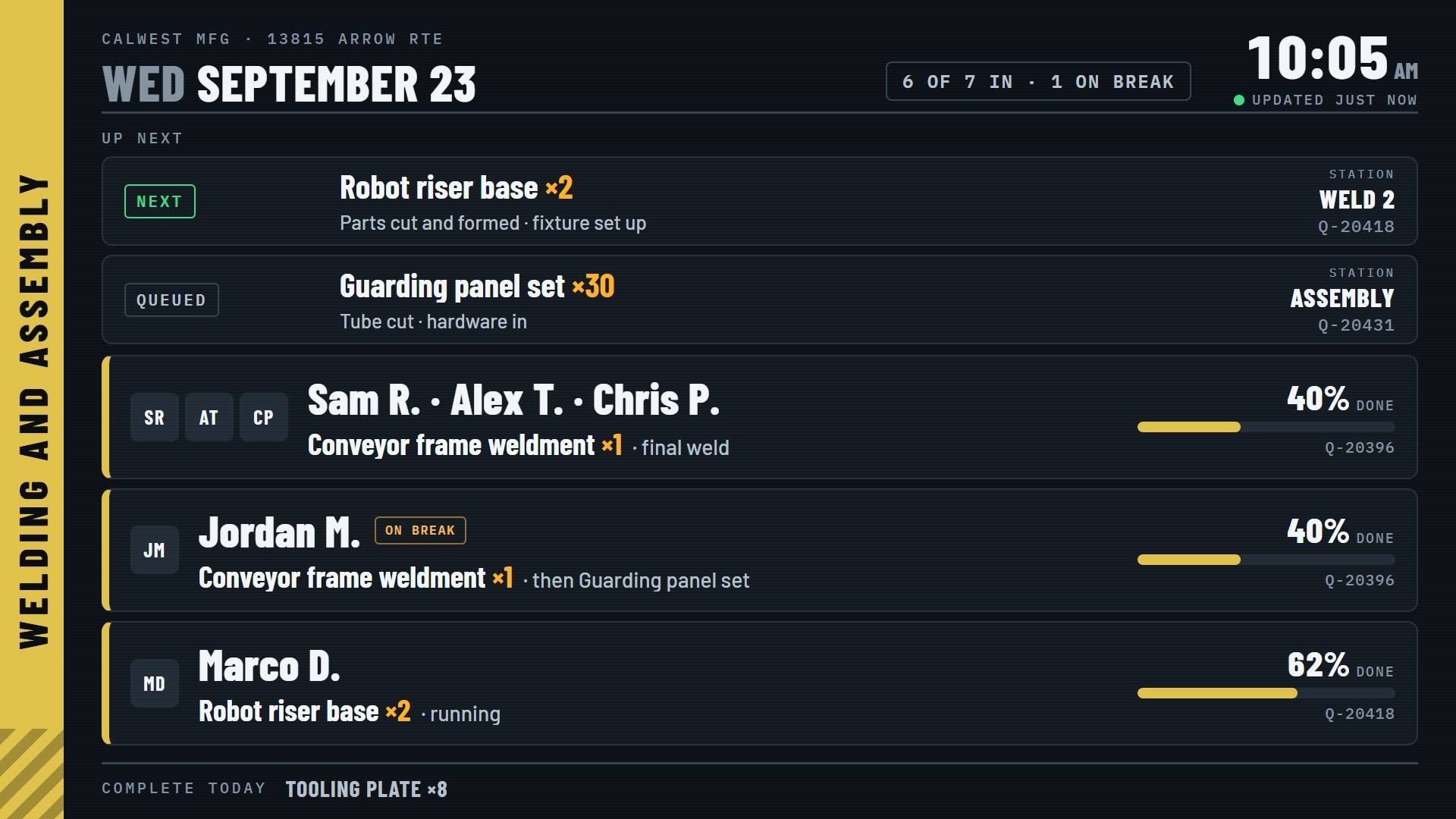
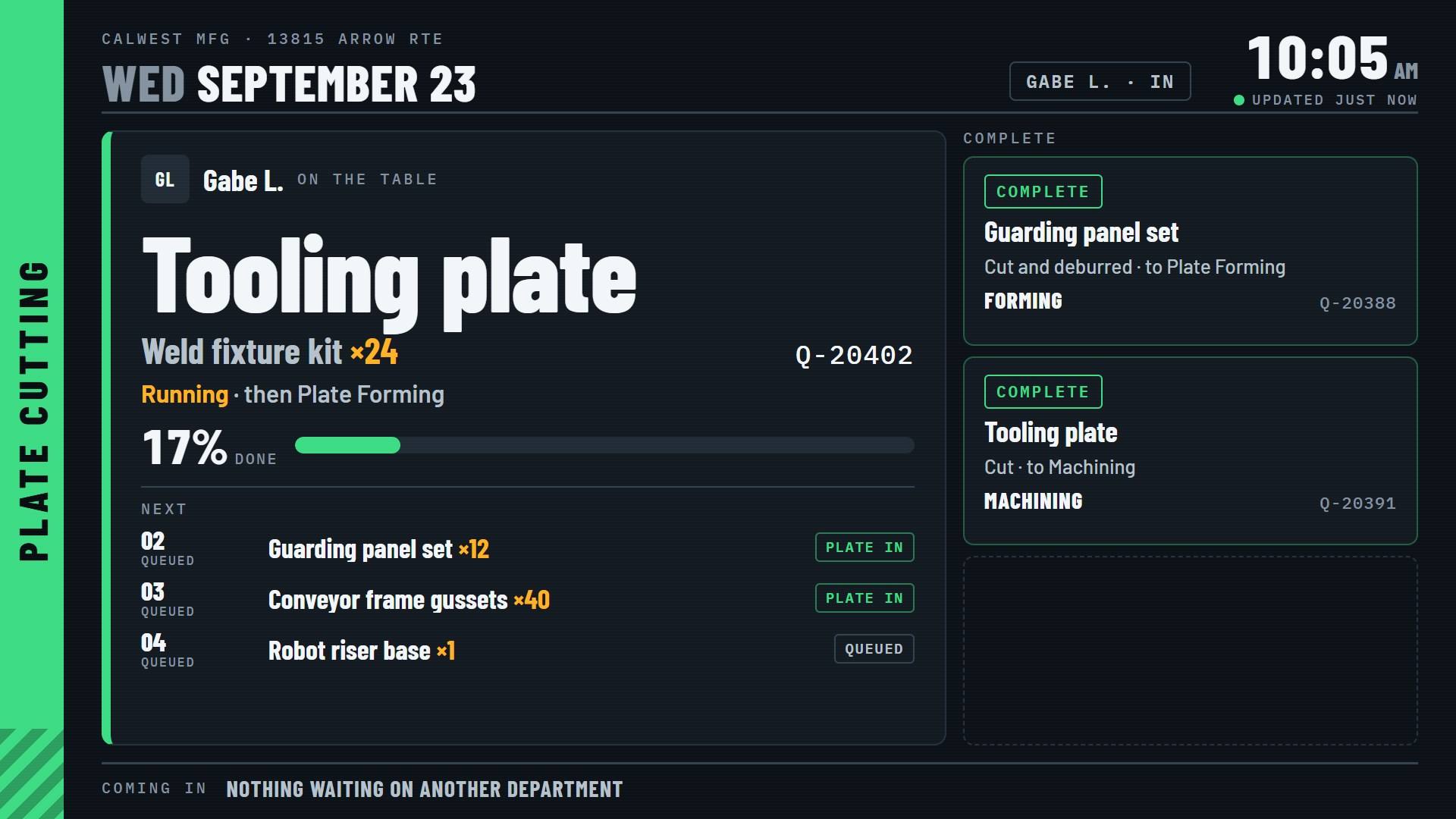
The shop’s departments have their own boards on the shop TVs. The welding and assembly board (Fig. 1) lists the next two jobs and the station each one goes to, then a row for each crew member with the job they are on and how far along it is, and a line at the bottom for what finished today. The plate cutting board (Fig. 2) gives the job on the table the biggest type in the room, lists the queue under it, and shows finished work on the right with where it goes next.
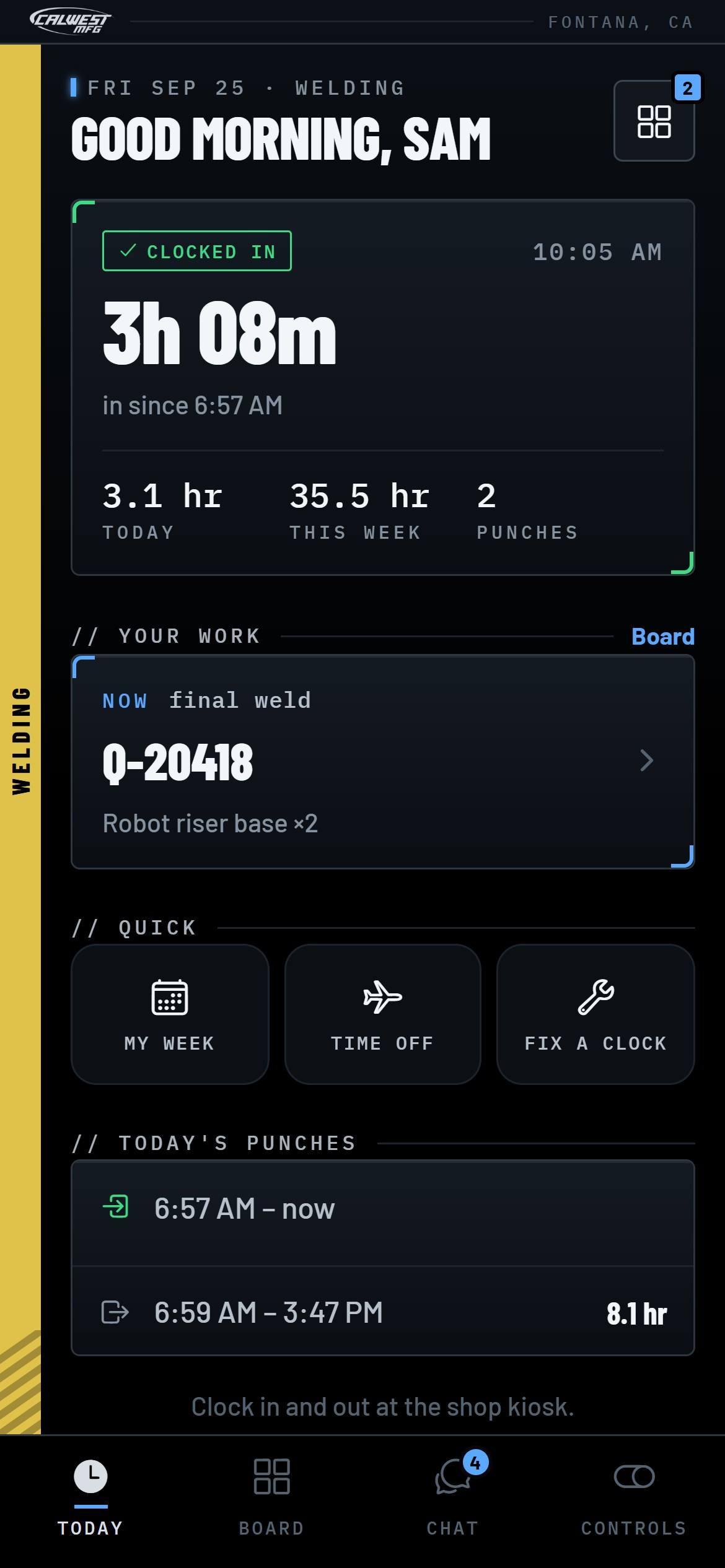
The crew also has an iPhone app with their jobs, schedules, team chat and push alerts. The Today screen (Fig. 3) puts the job a person is on at the top, with shortcuts to the week’s schedule and time off underneath. Job threads in the chat keep a drawing and the questions about it in one place instead of scattered across text messages.
Shop floor software, the ERP and the machines
ISA-95, the standard for connecting business systems to control systems, describes a plant in levels. Level 2 is the PLCs and other control devices. Level 3 is manufacturing operations management, the home of manufacturing execution systems. Level 4 is business planning and logistics, which includes the ERP.
Most custom shop floor software lives at level 3. It reads jobs from the ERP, shows the floor what to run, collects what happened from people and machines, and writes the results back. It doesn’t replace the ERP, and it shouldn’t try to.
A packaged manufacturing execution system can be the right call, especially across several plants or where a customer requires a particular system. Custom tools tend to win when the packaged ones don’t match how work actually moves through your shop, or when what you need is one good board and one good app rather than a platform to configure.
Production tracking software people actually use
A tracking system only works if people keep it current. A few rules decide whether they do:
- Enter each fact once, where the work happens. A job started at the saw is marked at the saw, not typed in later from a sheet.
- Use the ERP’s job numbers. Every board, phone screen and log points at the same job.
- Let machines report for themselves. Counts and faults read from a PLC don’t wait for the end of the shift and don’t get rounded.
- Show when the data was last updated. A board that might be stale has to say so, which is why ours shows “updated just now” next to the clock.
What a department board should answer
The most useful thing a board shows is not how busy a department is, but whether the next job can start. On our plate cutting board, each queued job carries a “plate in” tag once its material has arrived, and the footer says whether anything is waiting on another department. A lead looking up from the table can see that the next two jobs are ready and the third is not.
A good department board answers five questions without a click:
- What is running now, and how far along is it?
- What is next, and is everything it needs in the department?
- Who is on which job?
- What finished today, and where did it go?
- When was this screen last updated?
Factory TV dashboards that can be read from the floor
A TV board is read from across the shop by someone with their hands full. That rules out small type, dense tables and anything that needs a mouse. Ours put the job in hand and the people on it in the largest type, use color mostly to mark a state such as running, next or complete, and show one department per screen. They are web pages, shown in a browser on each TV, so changing a board means updating one page rather than visiting every screen.
Manufacturing app development for iPhone
A phone app earns its place when people are away from a screen: walking the floor, in another department, or home when a machine stops overnight. Push alerts are the strongest reason to have one. A supervisor learns that a cell has stopped without walking past it, which matters most on cells set up to run unattended, as our lights-out manufacturing guide explains. Decide which events send an alert and who gets each one, or phones buzz until people stop reading them.
Connecting software to machines and the ERP
The robot cells and machines we program can log every cycle and fault with a time stamp, searchable later. Custom Python ties those machines to the ERP, so counts, jobs and scrap post automatically and nobody re-keys them. Machine data and ERP integration covers how that link is built, and machine monitoring covers turning the same records into downtime reasons and OEE.
Operator screens at the machine are a separate piece of the same picture, covered on custom HMI. Keep the machine network apart from the office network and have IT review any link between them; the ISA/IEC 62443 series is the usual reference for that.
A sensible order for a shop software project
-
Walk the floor
Who needs to know what, when, and where they are standing when they need it. What is tracked by hand today, and who types it in.
-
Build one screen on real jobs
One board or one app screen, fed from your ERP's job numbers, in front of the people who will use it.
-
Run it in one department
Fix what the crew stumbles over before it spreads to the rest of the shop.
-
Connect machines and the ERP
Counts, faults and scrap flow in from the machines and back out to the ERP.
-
Hand over
Source, hosting and support arrangements as agreed in the quote.
Useful to send with your first message
- The ERP you run, and whether it is hosted or on a server at your plant
- How work moves through the shop today, department by department
- What people track on paper, whiteboards or spreadsheets now
- Which machines have PLCs, and their models
- Whether your crew uses iPhone, Android or shared tablets
The software is written by the same team that writes our robot and PLC code, so a cell and the boards that report on it can be built from the same data. The rest of that work is on robot cell controls and software, and a robot cell we build can report into tools like these. To talk through software for your floor, call or text (818) 397-4809.
Common questions
- Do you only write software for robot cells?
- No. The software that runs our own shop has nothing to do with a robot: it tracks jobs through departments, puts the work on TV boards and gives the crew an iPhone app with jobs, schedules, chat and alerts. Software is most useful when it is tied to something real, like machine counts or the ERP, but a board or an app for your floor can stand on its own.
- Will custom software replace our ERP?
- It shouldn't. The ERP stays the record for orders, jobs, inventory and costs. Shop floor software sits between the ERP and the machines: it reads jobs from the ERP, shows the floor what to run, and writes counts and scrap back so nobody re-keys them. Replacing an ERP is a different and much bigger project.
- Does it work on Android phones?
- Our app is written for iPhone. The TV boards are web pages that run in a browser, so they don't depend on anyone's phone. If your crew is mostly on Android or shares tablets on the floor, say so at the start, because it changes how the phone side of the project gets built and tested.
- Who owns the code?
- Settle that in the quote, whoever writes it. Spell out whether you receive the source code, who hosts the software, who pays for any outside services it relies on, and who maintains it after handover. A plant that owns the code and the hosting can move support to someone else later, which is worth knowing before the first screen is drawn.
- Where does the data live, and is it secure?
- Wherever your IT group decides: on a server at your plant or a hosted service. The machine network should stay separate from the office network, with any link between them reviewed by IT. The ISA/IEC 62443 series sets out security requirements for industrial automation and control systems and is a reasonable reference for that review.